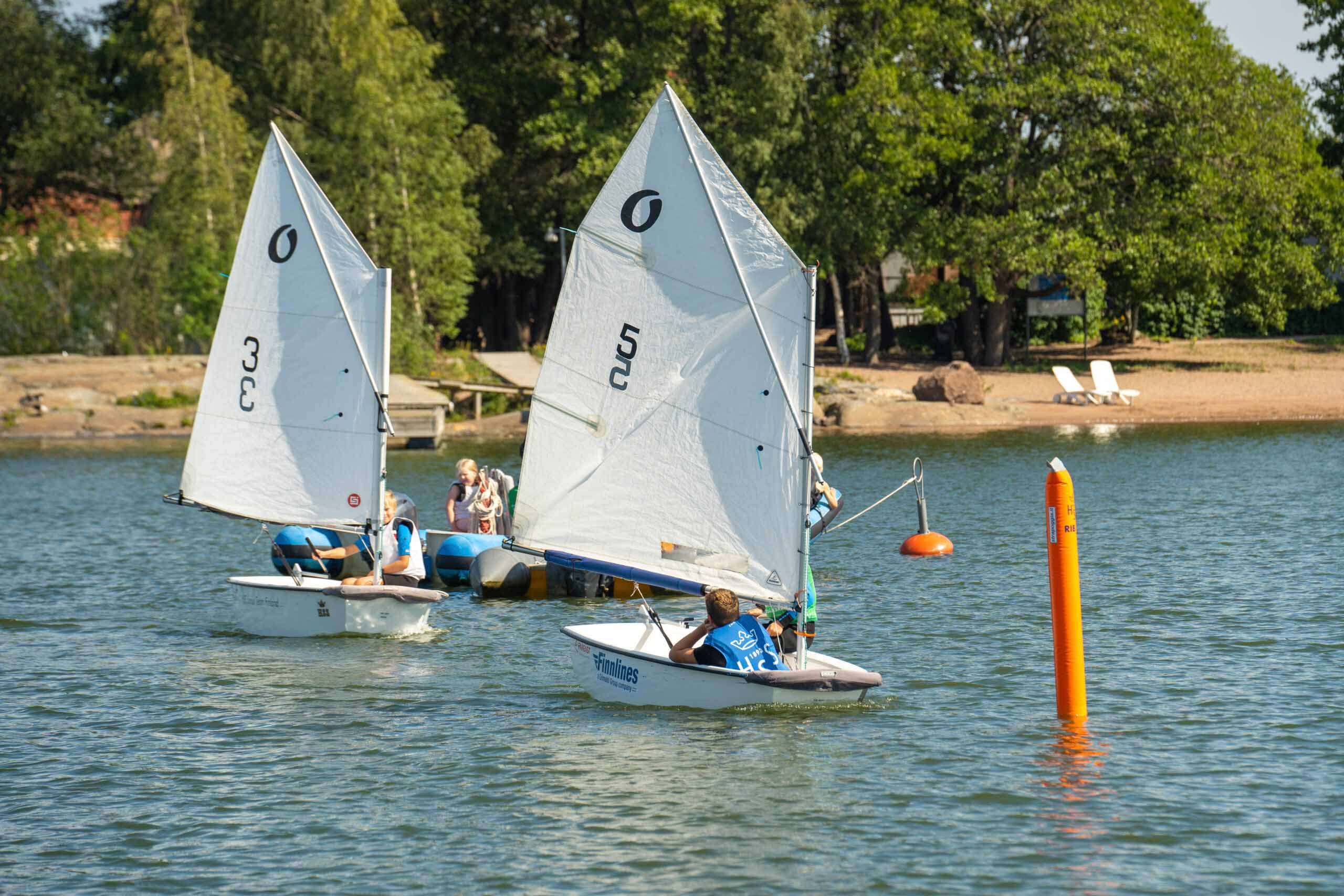
In summer 2024, we will organise seven summer camps for children and young people at HSS’s home harbour in Helsinki’s Liuskasaari.
Camps 2025
You can register for the camps in the Finnish Olympic Committee’s SuomiSport service. The links below will direct you to the service. The first time you use the service, you will need to create a personal Sport account, which you can use to access the services of many clubs. When you create an account, you will be asked for your personal ID, but this will not be known to the club and will not be needed when you log in later.
Discounts
Early Bird price eo February 399€ >> from 1 March 460€ Sibling discount / ‘Bring a friend’ discount 100€ If you join season training discount 100€
The camps will be sailed on a variety of boats (Optimist, OpenBIC and multihull RS Toura). In addition to sailing, the camps include windsurfing, water sports and a variety of activities. In addition to sailing, campers will learn about teamwork and have fun on the water.
For whom?
The camps are for children and young people aged 6-15 who can swim. Summer camps are suitable for both beginners and more experienced sailors. We take into account the age and sailing experience of the child/young person in the group allocation.
Course of the camp day
The camp day starts at 9.00 from the HSS ferry dock (Merisatamanranta, Ullanlinna) and ends at 17.00 at the same place. The camp day includes a nutritious lunch and snack. The camp day includes about five hours of varied physical activity, of which sailing is about half a day.
Campers are divided into two groups
Children’s group 6-10 years old
Youth group 11-15 years old
Both groups have their own camp contents, which take into account the age and sailing ability of the participants.
Equipment
Campers will receive a dinghy vest from HSS for the duration of the camp.
For summer campers, all you need is outdoor clothing suitable for the weather, sneakers, a hat, swimming gear and a change of clothes. In cooler weather, layering is a good solution. If you have a dinghy vest and/or wetsuit at home, you can take them with you to camp.
Sailing coaching
Sailing coaching and safe and inspiring learning on the water is provided by at least two trained and experienced HSS coaches. For each day there are learning objectives that take into account the campers’ previous sailing experience.
Finnish Sailing and Boating has selected HSS as the Junior Club of the Year for 2022 and 2023. Welcome to the most fun camp of the summer!
After the camp, you are welcome to continue your hobby at the HSS weekly training! Participants will receive a reduced* season fee (-100 € off the season fee). You can also start sailing directly in our beginner groups – sign up via this link.
*Discounts cannot be combined, a participant with a sibling discount registers for weekly training with the normal season fee.
Cancellation policy for camps can be found here and back to the Junior Sailing page here.
Finland Sport UKK
Sports account and login
You will always need your own personal Sport account to use Suomisport. When you log in to the service, Suomisport will detect whether you already have an account. This article explains how to log in or create a Sport account for the first time.
You can log in to Suomisport in the online browser version at suomisport.fi or by downloading the Suomisport mobile app from your app store. You will always remain logged in to the app, making daily use easier.
Watch the video tutorial on how to create / sign in to a Sport account:
How to log in to Suomisport / create a Sport account (browser version)
1. Start your registration or account creation by going to www.suomisport.fi
2. Click the Login button in the top right corner of the page.
3. Start your login or account creation by ordering a one-time access code with either your email address or phone number:
If you already have an account, subscribe to a single sign-up code for your contact, phone number or email, which can be found in your Sport Account.
As a personal user(mobile user), you do not have a permanent password for the service! To log in, you always need to order a new code.
4. You will receive a 6-digit single sign-on code in reply. The code is valid for 10min (SMS) and 30min (email). Enter the code you receive in the number field on the screen in your browser.
5. This will take you to the service or to the Sport Account creation page. If you are creating a new Sport account, fill in all the information requested.
How to log in to Suomisport / create a Sport account (Suomisport app)
Download the Suomisport app from your app store:
Parent / guardian How to log in to Suomisport (browser version)
Always log in to your Sport account first.
If you do not already have a Sport account, Suomisport will direct you to create one when you log in with your login code.
If your child does not have a Sport account, you can create an account with your own Sport account from the menu button in the top right-hand corner under Add Dependent or when you are buying a product for your dependent under Add New Dependent. NOTE: If your child already has a Sport Account but it is not linked to your own Sport Account, please contact Suomisport Customer Service or see here for instructions on how to make a possible custody link.
In the future, you will also be able to access your child/dependent’s Sport Account through your own Sport Account.
Image: menu button on your Sport account and adding a serviceable
A Sport Account is a personal and unique profile or user account for each person (user) in the Suomisport service.
Sportti-ID is a personal 8 or 9-digit number sequence that can be found on your SportTitle. You createan account and Sportti-ID when you log in for the first time.
You will need access to your Sport Account every time you shop at Suomisport. Your guardian must also have an account when using the service on behalf of their dependants.
The Sportti-ID is used by Suomisport to identify and personalise the users of the service. The information is kept up-to-date without duplicate accounts, regardless of the sport, club or activity.
Sportti-ID is not a login/username for the service, but your personal mobility ID, which will always remain the same throughout your life.
Thanks to personalisation, your data is kept safe and you can always check it yourself.
Sportti-ID allows you to be identified, for example, at a competition venue or other events.
2. Order a new login code, either for your email or your phone.
NOTE: Always order a code for the contact linked to your Sport account.
If both your contact details have changed, please contact our customer service: Send a support request here > or send an email to: suomisport@olympiakomitea.fi
Send a support request to Suomisport or send us an email to the support team or send us an email to the support team.
We deal with contacts in the order in which they are received.
Download the Suomisport app!
The Suomisport app is the easiest way to access your Sport account. Log in by ordering a login code with your phone number.
You can find the Suomisport app in your app store:
You will always need a personal Sport account to use Suomisport.
If you are creating an account for yourself or your dependent and Suomisport informs you that the person already has a Sport account or the personal ID you have provided is already in use, it is likely that the account has been created previously.
In Suomisport, each person(user) can have only one Sport Account.
The service uses your personal ID and contact details as a means of identification, so the same information cannot be linked to multiple Sport accounts.
The account may have been created previously by the club, another guardian/parent or by the child when using the service.
The service may also say “Social security number in use” if you misspell your social security number. The ID must be completely correct. The most common mistake is to enter the wrong punctuation mark (for people born in the 21st century the punctuation mark is “A”, for people born in the 20th century “-“).
How to do it:
1. If it is your own Sport account, contact our customer serviceto clarify the situation.
2. If it is a Sport Account of a service user, ask another carer to check their own account to see if there is a Sport Account for your child. If there is an account, ask them to add you as a guardian. You can also ask Suomisport Customer Service to create a guardian link.
NOTE: For security reasons, you must add a second guardian by the first guardian or by our customer service. Below are instructions for adding a second guardian.
Instructions for making a guardian link:
1. Login to your own Sport Account and transfer to your child’s account.
2. Click on Edit your details and select Add a guardian.
Select the child’s account and click on Edit your details and Add a guardian.
3. Find out and add the other guardian’s Sportti-ID number and surname.
Image.
4. Click on Add Guardian, the dependent’s Sports Account will immediately appear for the other guardian.
To use Suomisport, you always need a Sport Account for yourself and your dependent child. Guardians can use their own Sport Account as a parent/guardian on behalf of their child. You can find your dependent’s Sport Account on your own account.
Suomisport will always ask you when purchasing or registering whether you are registering yourself or your dependent/child for an event. Always indicate the person who will be participating in the activity or for whom you are buying a licence or pass.
You can find your child’s Sport account and details by first logging into your Sport account on the service. If your child or you do not yet have a Sport Account, you can create one when you are using Suomisport. Click here for instructions on how to create your own Sport Account. >
This is how you log in to Suomisport as a parent/guardian:
1. Log in to the service at www.suomisport.fi under Log in or download the Suomisport app to your phone from your app store.
Suomisport is a digital service platform for the entire sports community, with more than 800 000 Finnish athletes registered. Each user creates a Sport account when registering.
Suomisport is registered by e-mail or mobile phone number. In addition, the service asks for a personal identification number so that it can identify all users.
The ID is only used to identify the user at the time of the first registration. The collection of a personal identification number for identification purposes is necessary and lawful within the Service.
Why the use of the personal identification number is needed for personalisation:
Suomisport has over 800 000 registered users. There are many with the same name.
The service allows users to manage their own affairs and those of their dependants, regardless of sporting boundaries and different organisations, via the same Sport Account. With no duplicate accounts, the user experience and transactions are simple and straightforward. On your Sport Account, you will always find your personal and transaction data.
Dependants are always linked to the right parent. It is the right of the dependent to be associated with the right guardian.
When dealing with Suomisport, persons are bound by the rules of the association (club, sports federation, other organisations). By purchasing a competition licence/playing pass, they also agree to the rules of competition or anti-doping regulations of the sport. You need to know individually who they are. It is important for the association, the competition organiser, i.e. the keeper of the register, that the person making the commitment is definitely the one who has registered with Suomisport.
Various payments and commitments are made through Suomisport’s services. Personalised reminders and notifications are sent automatically. Unambiguous identification is important for both the data subject and the controller to ensure that payments and their reminders are addressed to the right persons.
How we protect your social security number:
Providing your ID is secure due to Suomisport’s high quality and audited security, the ID is encrypted before it is stored in the service. Personal data, such as the personal identification number, which are requested when creating a sports account, are processed in accordance with the terms of use of the service . The personal identification number is only processed in accordance with the law (Data Protection Act 5.12.2018/1050, § 29 Processing of personal identification number) and is not otherwise transmitted or processed in the Suomisport service.
If necessary, the ID is only visible to the system administrator for troubleshooting purposes.
When you register, the Suomisport service will create your own Sport account and Sportti-ID. Your Sportti-ID will serve as your identifier when using Suomisport, regardless of your sport and user role. Your Sportti-ID cannot be traced back to your personal identity number.
We take care of the security of the service at all times. The browser version and mobile applications (Android, iOS) of Suomisport have been security tested in 2024 by WithSecure. The tested security level was OWASP ASVS Level 3.
You can do business on behalf of your child in Suomisport, once you as the guardian have connected your child to a Sport account. If another guardian has created an account for your child, the guardian who created the account can add you as a second guardian, so that both of you can see your child’s Sport account and details.
You can see your child’s details in your Sportit account in the browser version of Suomisport or in the Suomisport mobile app after logging in.
Photo: you can easily find the Sport account and information of your dependants in the Suomisport app.
An adult child or a guardian of an adult child can remove the guardian link via their own Sport Account, provided that the child’s own Sport Account contains contact information (email address and mobile phone number).
If the contact information is missing, the guardian can add the information to the child’s account via the Edit your details section. Suomisport does not automatically remove the guardian link.
You can disconnect your service provider from your SportTitle account by logging in to Suomisport. You can remove the link from your own Sport Account by clicking on Edit your details and clicking on Remove carer link.
Organisational users (sport federation, club, regional, other organisational users) have a login and password to Suomisport.
To log in as an organisational user, you must have one of the access rights to the organisation that you have received from your organisation. If you do not have access rights, you can be invited to become an organisational user by the club’s current chief administrator, the sports federation or Suomisport’s customer service.
This is how you sign in as an organisational user:
2. Go to the bottom of the page to Log in as an organisational user.
3. Log in with your email address and the password you created. If you do not remember your password, click Forgot password? and request a password reset.
NOTE. if you use Suomisport as an organisational user frequently, I will save your browser to remember your login details. This will speed up your daily transactions.
As a user, you always log in to Suomisport with a one-time registration code, which you can order to the email address in your Sporttit account or via SMS on your phone.
If the code does not arrive or does not work, do this:
Make sure you have entered your phone number or email address correctly.
Make sure you have subscribed to the same email or phone number you used to create your Sport Account.
Try an alternative way to log in, using your phone or email, or download the Suomisport mobile app from the app store (AppStore or Google Play).
Make sure you try to sign in with the latest, valid code. A single-use login code is valid for 10 minutes. If the code has expired, please order a new one.
NOTE: If your email address is more specific, e.g. etunimi@sukunimi.com, the encoding of the link may change due to the encoding used by your email service provider, in which case always order the login code on your mobile phone.
If you are still having problems logging in, or your email and phone numbers have both changed since you last logged in, please email our customer service team at suomisport@olympiakomitea.fi. Suomisport’s customer service is available on weekdays from 8am to 4pm.
Only club, association or other organisational users who manage their organisation’s affairs on the service have their own password. Personal users (movers) do not have a password for the service.
As a movers, you always log in by ordering a new single sign-on code.
4. Subscribe to the password reset to the email that is added to your Sporttit account in the service.
Image: forgotten password button
You cannot use Suomisport without your own personal Sport account. An account is created the first time you use the service.
A guardiancan use the service on behalf of his/her dependants through his/her own account, once a guardianship connection with the dependants has been made.
If your ID is protected by a security blocking regulation, you can register with the service and request that your Sport Account is encrypted.
Send an email to our customer service: suomisport@olympiakomitea.fi NOTE: Please do not make any purchases or registrations on Suomisport until your account has been encrypted.
Suomisport may lock your Sport account if it encounters conflicting information. The account will be locked for security reasons.
In Suomisport, every user is unique. The parent or guardian should always create their own Sport Account before creating a Sport Account to be maintained. You or your dependent cannot have a double or triple account on the service.
Young dependants with their own smartphone can view their Sport Account details themselves and interact with their dependants in real time on the service. The young person must have their own e-mail address and phone number added to their Sport account details.
If the person you are servicing cannot see or access their Sport account, do this:
If a young person cannot see their Sport Account details, they may be missing their own phone number and email address from their Sport Account details.
2. Go to the dependent’s Sport Account under his/her name.
3. Go to Edit data and add the missing information.
4. Save your changes.
5. After saving, the Sport account will also be visible to the young person.
Image.
When a young person turns 18 If a young person does not want his or her guardians to see his or her Sport Account, he or she can remove the link or ask Suomisport’s customer service to remove it.
Registration and payment
Suomisport works like an online shop. Once you have reached the Suomisport checkout, you can choose your preferred payment method. Payment methods at Suomisport are provided by Svea Payments.
Buying/paying for products in Suomisport always requires a personal Sport Account.
Payments made through Suomisport are digital payments and are made immediately at the time of purchase, or you can choose to pay by Svea invoice or by direct debit if you want to have time to pay for your purchase.
Suomisport’s payment methods are provided by Svea Payments:
Online banking fee (Osuuspankki, Nordea, Danske Bank, Oma Säästöpankki, S-Pankki, Ålandsbanken, POP Bank, Säästöpankki, Aktia and Handelsbanken)
Debit and credit card payment (Visa, Visa Electron, MasterCard)
MobilePay, Pivo and Transfer
Svea Invoice and Svea Batch Payment*
* The Svea invoice payment method will incur a 5 EUR surcharge. The use of Svea invoice and batch payment methods is subject to a positive credit decision by Svea at the time of purchase. If credit cannot be granted, the user will be directed to choose another payment method. The purchaser of the invoice must be 21 years of age or older. If you need more information or assistance with your bill payment method, please contact Svea’s customer service.
The payments made to you by your club can be found and paid from your Sport Account under the “Payments” tab. The easiest way to access your Sport Account is to download the Suomisport app on your phone and log in at www.suomisport.fi
On the Payments tab, you will find pending and paid payments. Suomisport will notify you of new and overdue payments as notifications in the Suomisport app and to the email address on your Sport account.
You must be a member of a club (your club must have accepted your membership) or have joined a club group in order for the club to assign you a payment / for you to pay the club’s fee.
Payment of the fee
You can pay the club fee directly to the club using the payment method of your choice.
Suomisport uses online banks, debit and credit cards and mobile payment methods. mobile payment tools such as Mobilepay. You can also choose between invoice and direct debit.
In Suomisport, the range of payment methods is provided by Svea Payments.
You can browse paid payments on the Paid page and click on the payment to see more details about the payment.
NOTE: The fee paid by the dependent will also be removed from the other carer’s open fees, so you cannot accidentally pay the fee twice.
If you cannot access the payment service at all from the Suomisport app, please check the following:
Have the latest version of the app on your phone.
Whether your phone’s browser cookies are enabled.
Is your phone’s operating system up to date with the latest updates?
Are you missing information about your Sport account.
If you are looking for information on why your payment was left in the “Waiting for payment details” status, click here >
Generally when a payment goes into “waiting for confirmation” it means that the payment has been interrupted for one reason or another – sometimes this happens in online shops.
If you think you have time to confirm the payment normally, it is likely that there will be a delay before the payment goes through, in which case the payment in the “waiting for confirmation” status will disappear and become a paid payment within a few working days at the latest.
If the payment was interrupted before confirmation, it may not go through at any stage. In this situation, a payment in “waiting for confirmation” status will disappear/revert back to an open payment on its own within a few days.
However, a pending payment does not prevent the payment of the fee. So if you know that the payment was interrupted before you verified it, you can try to pay again as normal. Check how the payment looks in your bank account. In general, payments in the “pending” state will appear in the bank as a cover booking, not yet as a debit to the account.
Suomisport’s membership management operates in accordance with the Associations Act. Members must apply for membership of the club via the membership link, which you can obtain from your club.
After the membership application, the club accepts new members in Suomisport. After approval, you will find your membership card in the Suomisport mobile app.
You can usually find the link to join on your club’s website. If you can’t find the link, please contact your club. You can create a sports account when you join your club or you can do it separately first at www.suomisport.fi under “Sign in”.
Once your club has accepted you as a member, you will see a digital membership card in your Sport account.
Download the SUomisport app to your phone from the app store:
Suomisport’s membership management operates in accordance with the Associations Act. Members must apply for membership of the club via the membership link, which you can obtain from your club.
After the membership application, the club accepts new members in Suomisport. After approval, you will find your membership card in the Suomisport mobile app.
You can usually find the link to join on your club’s website. If you can’t find the link, please contact your club. You can create a sports account when you join your club or you can do it separately first at www.suomisport.fi under “Sign in”.
Once your club has accepted you as a member, you will see a digital membership card in your Sport account.
Download the SUomisport app to your phone from the app store:
This article explains how a member can resign from a club in Suomisport
Suomisport’s membership management operates in accordance with the Associations Act. When applying for resignation, the member must notify the club of the resignation. So be the first to contact the club and ask for resignation!
In Suomisport, only the club user can remove a member from the association’s membership list. A member cannot be removed from a membership category by the member himself/herself.
According to the Associations Act, a member may resign from the association at any time by notifying the association’s board or its chairman in writing. A member may also resign by notifying the Association at a meeting of the Association and having it entered in the minutes. The rules may stipulate that the resignation shall not take effect until a specified time has elapsed after the notice of resignation has been given.
The Association may expel a member on the grounds for expulsion set out in the statutes and on the general grounds of the Associations Act if the member has failed to fulfil the obligations to which he or she committed by joining the Association or has caused serious damage to the Association by his or her conduct within or outside the Association; or no longer fulfils the conditions of membership set out in the Act or in the statutes of the Association.
If your club uses Suomisport for membership management, you can find your membership card in the Suomisport mobile app under Memberships. The Sporttit account does not show the memberships of clubs that are managed outside Suomisport.
With a membership card, you can verify your membership of your club. In the Memberships section you can find all the club memberships you have joined in Suomisport.
The membership card is double-sided; if your club has membership benefits, you can find them by clicking on the card image on your phone.
The Suomisport service sends automatic notifications to users about club fees when
the club has issued a new membership or seasonal fee to the rider
a membership or seasonal fee assigned by the club is due or has become due (notifications will be sent every 2 months after the due date until the fee is paid or the club has cancelled the payment)
Notifications will be sent to the Suomisport mobile app and to the email of the runner and his/her guardian. The message will read:
whose payment is involved
which fee is involved
which club’s fee is involved
If you feel that the payment is unnecessary/incorrect, contact the club whose payment is involved. If it is a new membership fee and you no longer wish to be a member of the club, contact the club and ask to leave the club.
Only the club can make changes to its own fees and membership.
Payment receipts for Suomisport event registrations can be found in the Sport account under My registrations.
You can also access the receipt via the Calendar tab of your Sport account in the Suomisport app.
Select My registrations and View details for the event for which you are looking for a receipt. Print the receipt if necessary.
It is currently not possible to pay directly with sports discounts at the Suomisport cash desk.
If your federation or club has its own contract with a sports benefits provider, the federation or club can accept sports benefits as a means of payment. Please always check with your provider if they accept sports benefits.
NOTE: Sports benefits must always be used to pay for personal services that allow you to exercise. In case of doubt, always check the tax authorities’ instructions on what you can pay for with sports benefits.
You can download the Suomisport app on your phone from the app store (AppStore or Google Play).
For example, the app makes it easier to sign in to the service, as you don’t have to use the one-time sign-in code again and again. Your club membership card, valid licenses/playing pass, insurance and event registrations are always available on your phone.
The app gives you convenient access to your dependants’ details. If you are a coach, you can manage your own teams and groups from the app.
Through the app you can buy licences and insurance, register and pay for sport and club events.
If your club uses Suomisport for a variety of purposes, you can receive notifications, messages, see group training calendars and much more in one convenient place.
The app is constantly being developed. Please note that the functionality of the app version may be more limited than the browser version. Please remember to update your app from time to time to make sure you have access to all the new functionality. To update, log out of the application and log back in.
Suomisport works with all major web browsers and with the handy Suomisport app on your phone.
The app allows you to access your own and your dependants’ Sport accounts without logging in.
Suomisport works with all browser versions and the Suomisport app.
The best web browsers to use the service are Chrome. The functionality of Microsoft Internet Explorer cannot be guaranteed for Suomisport, as Microsoft has discontinued support for this browser.
You can download the Suomisport mobile app on your phone from your app store (AppStore or Google Play).
You can use Suomisport on your smartphone, either with a web browser or by downloading the Suomisport app. You can download the mobile app to your phone from your own app store (AppStore or Google Play).
Download the Suomisport app!
You can find the Suomisport app in your app store.
Please note that the functionality of the Suomisport application may be more limited than the browser version. Please remember to update your app from time to time to ensure that you have access to all the new functionality.
To update, log out of the application and log back in.
Your personal data is safe with Suomisport, in your own Sport Account and managed by you.
The processing of personal data in Suomisport is carried out by those who have been granted access to the system.
Each organisational user who has been granted access is bound by Suomisport’s data protection terms and conditions.
The ID is only used as an identification tool for the first registration. The collection of a personal identification number for identification purposes is necessary and lawful within the Service. It will only be visible to the system administrator, if necessary, for the purpose of correcting errors.
Experts from the security company WithSecure were commissioned by the Olympic Committee to assess the security of Suomisport in January 2024.The thorough assessment and related testing did not identify any vulnerabilities requiring immediate action or critical vulnerabilities. The security level tested was OWASP ASVS Level 3. The technical security foundation of Suomisport is in place. Security testing is carried out on a regular basis.
Suomisport is the sports community’s own digital service, whose users are sportsmen and women, sports clubs and sports federations. The service is a member service provided by the Finnish Olympic Committee for its member federations and clubs.
All the necessary sports services to make the everyday life of athletes, parents, federation and club officials, volunteers and coaches easier can be found on the same platform and in a single application.
Suomisport is produced jointly by the Finnish Olympic Committee and the sports federations and has no commercial objectives. The international IT company Vincit Oyj is the technical development partner of Suomisport. Suomisport is developed in cooperation with sports federations and clubs based on user feedback and needs. Suomisport has been developed since 2017.
More than 800 000 Finns have a Sport account with Suomisport. In total, more than 4000 sports clubs and federations have used Suomisport’s services.
Suomisport is an online shop for sports clubs and associations, where users can buy sports services or products. Financial transactions between users and sports organisations are carried out without invoicing, in the form of digital payments. This has saved federations and clubs time from administrative work to direct action – getting children, young people and adults moving.
Suomisport collects information on sporting activities, which verifies the impact of sport in society. The data is also used for research, for example in health promotion projects of the THL. The more sports and sports clubs and users use Suomisport, the more general, socially relevant information and data on physical activity and recreation in Finland will accumulate.